
Midarion Casino Mobile App & Install Guide
If you love playing on your phone, you’ll be happy to know that Midarion works great on mobile, even if you do not install a classic store app.
We’ll walk you through how to treat Midarion like a full Midarion app on both Android and iOS, how to add it to your home screen, and how to handle registration, login, and bonuses on the go.
Introduction – Does Midarion Have a Dedicated Mobile App?
Right now, we don’t have a separate Midarion APK on Google Play or a native Midarion casino app on iOS in the App Store.
Instead, we run as a Progressive Web App, so you can add Midarion to your home screen from your mobile browser and use it just like a regular Midarion app.
The big plus is that you don’t need to worry about store restrictions or constant app updates; you just open the site, and everything is already up to date.
Bottom line, you still get a fast, touch-friendly Midarion mobile experience, including casino, live casino, jackpots, sports, live betting, promotions, and Bonus Crab.
How to Add Midarion to Your Home Screen
If you want a Midarion download app-style shortcut, you can create it straight from your browser in under a minute.
Once you do this, Midarion will sit on your home screen with its own icon, open in full screen, and feel very close to a native Midarion casino Android or iOS build.
Android – Step-by-Step Instructions
Let’s dig into how to get your Midarion APK like shortcut on Android:
- Open your mobile browser
- Go to the official Midarion site and let it fully load
- Tap the menu icon with three dots in the upper right corner of the browser window
- Scroll the menu, find “Add to Home screen” and tap it
- Choose the shortcut name (for example, “Midarion app”) and confirm, your device will place the icon on the home screen
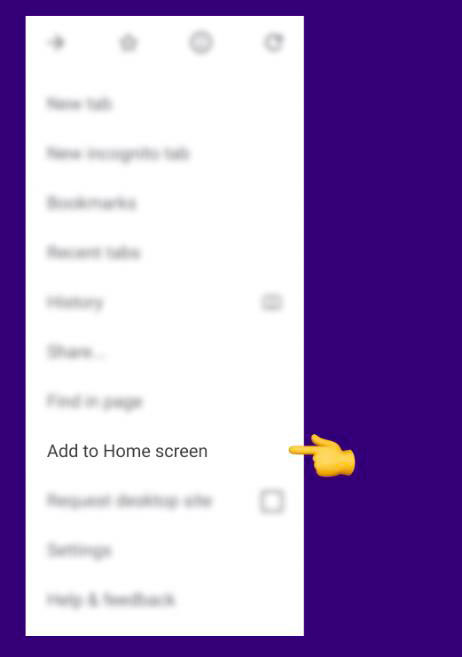
Now you can launch Midarion from that icon, just like any other Midarion download app, and jump straight into casino, sports, or live betting.
iOS – Step-by-Step Instructions
On iPhone and iPad, you can turn Midarion into a shortcut from Safari:
- Open Safari and visit the Midarion website, wait till the page is fully loaded
- Tap the “Share” icon, the square with an arrow pointing up
- In the menu that appears, scroll down, select “Add to Home Screen”
- Type a name for the shortcut, like “Midarion app”, then tap “Add”
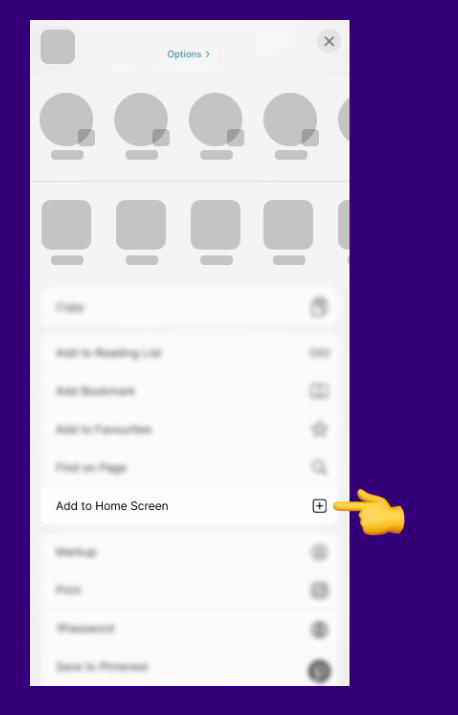
After that, the icon will appear on your home screen, and Midarion will open in its own window, looking and behaving very similar to a native Midarion casino app iOS client.
Navigating Midarion Casino on App
Once your shortcut is ready, you’ll see the familiar Midarion layout adapted for smaller screens, with quick access to casino, live casino, jackpots, sports, live betting, virtual sports, challenges, Bonus Crab, shop, and VIP levels.
You control everything through the sidebar menu and the category tabs at the top of the game area, just like on desktop, only optimized for taps and swipes.
Casino, Live Casino & Jackpots on Mobile
Now, when you open the “Casino” section from your Midarion app style shortcut, you’ll see the same categories as on desktop: Top, New, Popular, Exclusive, Slots, Bonus Buys, Megaways, Table Games, and more.
Live Casino gives you roulette, blackjack, baccarat, poker, and game shows, all streamed in real time and fully usable on touch screens.
Jackpots have their own mobile-friendly area with Hot Jackpots, Lucky Jackpots, New Jackpots, Drops & Wins, Daily Jackpots, and Jackpot Play.
You can scroll through providers, search for titles, and open games in portrait or landscape, depending on what feels better for you.
Popular mobile categories
| Section | What you’ll find on mobile |
| Casino | Top, New, Popular, Exclusive, Slots, Table Games |
| Live Casino | Roulette, Blackjack, Baccarat & Dice, Poker, Shows |
| Jackpots | Hot, Lucky, New, Drops & Wins, Daily, Jackpot Play |
Bottom line, whether you launch a quick slot session or sit at a live blackjack table, the Midarion mobile layout keeps everything easy to reach with one hand.
Sports Betting & Live Betting on Mobile
Here’s how it works when you use your Midarion app-style shortcut for sports: you land in the Sportsbook section with football, basketball, tennis, ice hockey, American football, cricket, and more, plus filters for popular, in-play, and upcoming events.
Odds, match lists, and bet slips are all adjusted for vertical screens so you can place a bet with a couple of taps.
Live betting has its own menu entry with in-play events and dynamic odds that refresh as the game changes.
You can combine selections into accumulators, track your bet slip at the bottom of the screen, and swipe to manage or remove picks.
Mobile sports features:
- Pre-match betting for top leagues and niche competitions
- Live betting with constantly updated odds
- Market types like Money Line, Totals, Both Teams to Score, and more
- Mobile bet slip with multi bet and accumulator support
So even without a separate Midarion download app, you still get a full-scale sportsbook in your pocket.
Promotions, Challenges & Bonus Crab on Mobile
Another standout on mobile is that you don’t miss any of the extra value features Midarion is known for.
Through your shortcut-based Midarion app, you can open the Promotions page, switch between casino and sports offers, and claim deposit bonuses, reloads, cashback, and boosted odds.
Challenges and tournaments have their own sections in the sidebar, with banners and leaderboards adapted for smaller screens.
Bonus Crab, our claw-style bonus game, is also available in mobile format so you can grab prizes with taps instead of clicks.
Mobile extras you keep
| Feature | Available on mobile shortcut? | What you get |
| Promotions | Yes | Casino & sports bonuses, cashback |
| Challenges | Yes | Tasks, coins, rewards |
| Bonus Crab | Yes | Skill style bonus mini game |
| Tournaments | Yes | Leaderboards with prize pools |
Honestly, you can do your full grind, from challenges to Bonus Crab spins, straight from your phone.
Registration & Login on Mobile
You don’t need a special Midarion casino app to create an account; the mobile browser flow is the same as on desktop, but scaled to your screen.
Both registration and login are available from the header, and pop up in clean, touch-friendly forms.
Creating an Account via Mobile Browser
Let’s walk through the full signup process on your phone:
- Tap “Register” from the top of the screen in your mobile browser or Midarion app shortcut
- On Step 1, select your welcome bonus (casino package up to €3,000 + 350 free spins + 1 Bonus Crab, sports bonus, or “No bonus”) or enter a promo code if you have one
- Enter your email and create a secure password, accept Terms and Conditions, and Privacy Policy
- On Step 2, fill in personal details like name, date of birth, address, phone, country, and choose EUR as your currency
- Confirm everything and tap “Create Account” to finish registration
Once your profile is ready, you can deposit from mobile using bank cards, e-wallets, or other available methods and start playing.
Mobile registration steps:
- Open Midarion and tap Register
- Pick a welcome offer or “No bonus”
- Fill in your email, password, and accept the terms
- Add personal data and confirm the account
Bottom line, it’s a two-step flow that takes just a couple of minutes, even on a smaller screen.
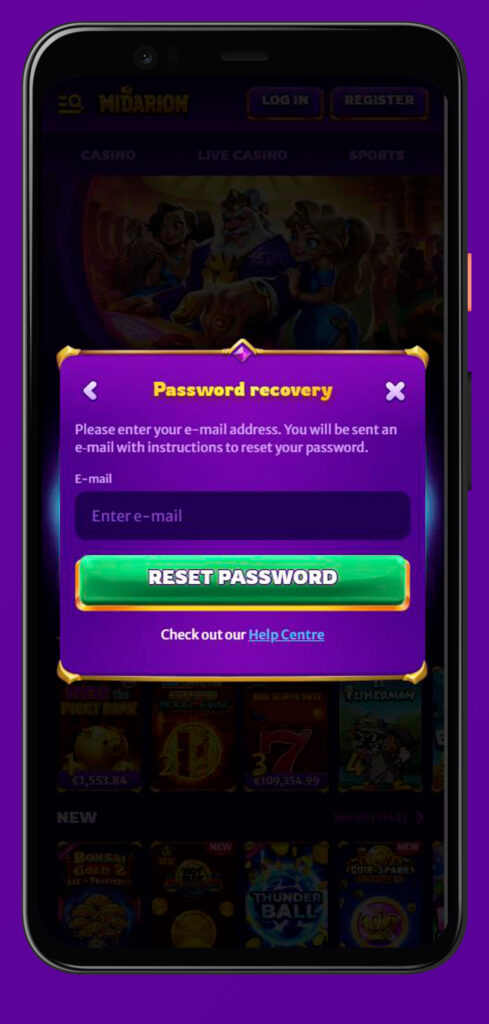
Logging In on Mobile
Logging into Midarion on your phone is straightforward and works the same in all browsers:
- Tap “Log in” in the header
- Enter the email and password you used during registration
- Hit the login button, and you’ll see your balance, access to the cashier, and all game sections
If you keep the Midarion app style shortcut on your home screen, you can jump straight into the login form with just one tap, no need to type the URL every time.
Advantages of the Midarion Mobile Platform
Now, why stick to the Midarion mobile site instead of waiting for a standalone Midarion APK?
- No store limitations, you always access the latest version directly in the browser
- Full feature parity: casino, live casino, jackpots, sports, live betting, virtual sports, promotions, VIP, payments, and support all work on mobile
- Light on storage, the shortcut-based “Midarion app” barely uses any space compared to traditional apps
- Same secure environment with licensed operation, payment gateway integration, and responsible gaming tools
Mobile vs classic app feel
| Aspect | Midarion mobile shortcut | Typical store app |
| Install source | Browser “Add to Home Screen” | App Store / Google Play |
| Updates | Automatic via website | Manual / auto app update |
| Features | Full casino + sportsbook | Depends on the provider |
| Storage usage | Very low | Higher |
So if you’re browsing from Android or iOS, the Midarion mobile platform already gives you the full package without any extra downloads.
Frequently Asked Questions
Does Midarion have an official Midarion app in stores?
No, at the moment we don’t offer a native APK on Google Play or a Midarion casino app on iOS in the App Store; you play via mobile browser with a home screen shortcut.
Is there a safe way to download the Midarion app?
You don’t need to download any external installer; just open Midarion in your mobile browser and use “Add to Home Screen” on Android or iOS to create a safe shortcut.
Can I access all casino and live casino games on mobile?
Yes, you get the same casino, live casino, jackpots, and providers as on desktop, just displayed in a touch-friendly grid with filters and categories.
Can I bet on sports and live betting from my phone?
Absolutely, the full sportsbook and live betting section is optimized for mobile with lists, odds, and a collapsible bet slip.
Are promotions, challenges, and Bonus Crab available on mobile?
Yes, all regular promotions, Challenges, tournaments, shop, and Bonus Crab are fully available when you use Midarion from your phone.
How do I deposit and withdraw using the mobile version?
Tap your profile or cashier icon to open the payments page, then choose from the same supported methods and limits as on desktop, all shown in EUR.